The best frugal apps for parents make it easier to save money on groceries, household bills, gas, clothing, and children’s expenses without spending hours searching for deals. With family costs continuing to change, parents need simple ways to manage their money and stretch every paycheck. The right apps can help you find grocery discounts, earn cashback, track spending, compare prices, and plan for future expenses. Whether you’re raising toddlers, managing a large household, or living on a tight budget, these 17 frugal apps can help you make smarter spending decisions and keep more money in your family’s pocket.
What Are Frugal Apps and How Do They Help Parents Save Money?
Frugal apps are mobile tools that help families reduce everyday expenses through cashback rewards, digital coupons, budgeting, price comparisons, and spending tracking. They make it easier to find discounts, avoid unnecessary purchases, and organize household finances. Parents can use different apps together to save on groceries, gas, bills, and children’s needs.
These apps generally fall into several categories:
- Cashback apps: Return a portion of eligible purchases.
- Coupon apps: Help shoppers find digital discounts and promotional offers.
- Budgeting apps: Track income, expenses, and savings goals.
- Price comparison apps: Help find lower prices before purchasing.
- Receipt reward apps: Give points or rewards for eligible receipts.
- Meal planning apps: Help reduce food waste and unnecessary grocery spending.
- Bill management apps: Help identify subscriptions and recurring expenses.
The important thing is to choose apps that solve actual problems in your household. Downloading every money-saving app available won’t automatically make you more frugal.
17 Best Frugal Apps for Parents to Save Money
The best money-saving apps for families serve different purposes. Some focus on grocery cashback, while others help parents control spending, find cheaper fuel, or manage children’s allowances. Here are 17 useful options, including free and paid tools, and what each one does best.
Best Cashback Apps for Groceries and Everyday Shopping
1. Ibotta – Best for Grocery Cashback
Ibotta: Build Earn Cash And Save App
Best for grocery rebates
Ibotta helps shoppers earn cashback on eligible groceries, household products, and other purchases. Parents can browse available offers, add qualifying deals, shop, and submit receipts or use supported retailer accounts.
Website: Ibotta official website
Why parents should use it:
- Find rebates on selected grocery products.
- Save on eligible household and personal care items.
- Earn rewards on purchases you already planned.
- Track available cashback in one place.
Money-saving tip: Check Ibotta before creating your grocery list. Only add products your family actually needs. A cashback offer isn’t a bargain if it makes you buy something unnecessary.
2. Fetch – Best for Receipt Rewards
How Does Fetch Rewards Work? Easy Guide – The Krazy Coupon Lady
Fetch
Best for simple receipt scanning
Fetch rewards users with points for eligible shopping receipts and certain participating brands. Parents can scan qualifying receipts and redeem accumulated points for available rewards.
Website: Fetch official website
Why parents should use it:
- Earn points from eligible everyday purchases.
- Scan receipts without manually selecting every offer.
- Find additional brand-specific promotions.
- Redeem points for available gift cards.
Money-saving tip: Make receipt scanning part of your grocery unpacking routine. Check the app’s receipt submission deadlines and eligibility rules.
3. Shopkick – Best for Shopping Rewards
How Shopkick is Seeing Exponential Growth Through Mobile Partnerships
Shopkick
Shopkick offers reward points, called kicks, through eligible shopping activities. Depending on current offers, users may earn rewards from store visits, product scans, purchases, and online shopping.
Website: Shopkick official website
Why parents should use it:
- Find participating store promotions.
- Earn rewards through eligible activities.
- Discover product offers before shopping.
- Redeem points for available gift cards.
Money-saving tip: Use Shopkick during shopping trips you already planned. Avoid making extra trips just to collect small rewards.
Best Apps for Online Shopping Discounts
4. Rakuten – Best for Online Cashback
Rakuten: Shop. Get Cash Back. Repeat.
Rakuten
Rakuten offers cashback through participating retailers. Parents can use it when buying clothing, school supplies, household products, and other planned purchases online.
Website: Rakuten official website
Why parents should use it:
- Earn cashback at participating retailers.
- Find online shopping promotions.
- Make planned back-to-school purchases more affordable.
- Track eligible rewards.
Money-saving tip: Compare the retailer’s final price with other stores before shopping through Rakuten. A higher-priced item with cashback may still cost more.
5. PayPal Honey – Best for Finding Online Coupons
PayPal Honey: Coupon Codes and Cash Back Offers | PayPal US
PayPal Honey
Honey is a shopping browser extension that helps users find and test available coupon codes at participating online stores. It can also provide price-related shopping features where supported.
Website: Honey official website
Why parents should use it:
- Search for available coupon codes.
- Reduce the time spent testing discounts manually.
- Find deals on clothing, toys, and household products.
- Check eligible shopping rewards and features.
Money-saving tip: Compare the final checkout price instead of assuming the first coupon is the best deal.
6. Capital One Shopping – Best for Online Price Comparisons
The Best Browser Extensions and Apps For Saving Money Online | OnlineShoppingTools
Capital One Shopping
Capital One Shopping helps consumers compare prices, discover coupon codes, and identify potential savings when shopping online.
Website: Capital One Shopping official website
Why parents should use it:
- Compare prices across participating retailers.
- Search for available coupon codes.
- Find potential discounts on household purchases.
- Check product prices before ordering.
Money-saving tip: Use it before buying expensive items such as laptops, appliances, and children’s furniture.
Best Apps for Saving on Groceries and Meal Planning
10. Flipp – Best for Comparing Weekly Grocery Deals
Flipp – Flyers, Shopping List, Weekly Ads | Flipp
Flipp
Flipp helps shoppers browse weekly store flyers and find local discounts. Parents can compare promotions before deciding where to shop.
Website: Flipp official website
Why parents should use it:
- Browse weekly grocery advertisements.
- Compare promotions at different stores.
- Find digital coupons where available.
- Plan shopping around lower prices.
Money-saving tip: Check Flipp before your weekly grocery trip. Build your shopping list around discounted items your family regularly uses.
11. AnyList – Best for Organizing Meal Plans and Grocery Lists
How do I quickly move a recipe or note to another day in the meal planning calendar? – AnyList Help
AnyList
AnyList helps families organize grocery lists, save recipes, and plan meals. Its shared lists can make shopping easier when both parents help manage household purchases.
Website: AnyList official website
Why parents should use it:
- Organize weekly grocery lists.
- Save family recipes.
- Share shopping lists with household members.
- Keep track of ingredients before visiting the store.
Money-saving tip: Plan five or six meals before shopping. Check your refrigerator and pantry first so you don’t buy ingredients you already have.
12. Too Good To Go – Best for Discounted Surplus Food
Too Good To Go Marketplace App | How It Works – Too Good To Go
Too Good To Go
Too Good To Go connects shoppers with local businesses selling surplus food at reduced prices. Customers reserve available Surprise Bags and collect them during the specified pickup window. Too Good To Go+1
Website: Too Good To Go official website
Why parents should use it:
- Find discounted food from participating businesses.
- Discover bakery and grocery offers.
- Reduce food waste.
- Save on suitable snacks and meals.
Money-saving tip: Check what food is included before purchasing when details are available. Surprise Bags may contain items your family doesn’t eat, so don’t buy them simply because they look cheap.
Best Apps for Saving on Gas and Household Bills
13. Upside – Best for Gas and Everyday Cashback
Download the Upside App & Save Money on Things You Do Every Day!
Upside
Upside offers cashback on eligible purchases at participating gas stations, restaurants, and grocery businesses. Users claim an available offer before making a qualifying purchase. Upside
Website: Upside official website
Why parents should use it:
- Find participating fuel offers.
- Earn cashback on eligible purchases.
- Discover local participating businesses.
- Track rewards through the app.
Money-saving tip: Compare the actual gas price before claiming an offer. Driving farther to earn cashback can cost more than you save.
14. GasBuddy – Best for Finding Cheaper Gas
GasBuddy
GasBuddy helps drivers compare reported fuel prices at nearby gas stations. It can help parents find cheaper places to refuel rather than automatically choosing the closest station.
Website: GasBuddy official website
Why parents should use it:
- Compare reported gas prices.
- Find nearby fuel stations.
- Plan fuel stops along regular routes.
- Avoid paying more than necessary for gas.
Money-saving tip: Check fuel prices before leaving home. A small price difference can add up for families that drive frequently.
15. Rocket Money – Best for Tracking Subscriptions and Bills
Best Budgeting Apps For People Who Hate Budgeting | Debbie Blog
Rocket Money
Rocket Money helps users monitor spending, track recurring subscriptions, manage budgets, and review financial activity. Some additional features require a paid Premium plan. Rocket Money
Website: Rocket Money official website
Why parents should use it:
- Identify recurring subscription payments.
- Find services the family no longer uses.
- Review monthly spending.
- Monitor household expenses.
Money-saving tip: Review your subscriptions every month. Cancel streaming services, memberships, and apps that your family rarely uses.
Best Apps for Teaching Kids About Money
16. Greenlight – Best for Teaching Kids Financial Responsibility
Greenlight® – Kids’ Debit Card – Manage Chores
Greenlight
Greenlight is a family money management service designed to help parents teach children about spending, saving, and financial responsibility. It includes parent controls, allowance tools, and savings goals. It is subscription-based, with plans and fees to check before signing up. Greenlight
Website: Greenlight official website
Why parents should use it:
- Set up allowances.
- Create savings goals for children.
- Monitor eligible spending.
- Introduce children to money management.
Money-saving tip: Give children a small regular allowance and encourage them to divide it between spending and saving. This helps them understand that money has limits.
17. GoHenry – Best for Children’s Money Management
Kids Debit Card | Prepaid Debit Card for Children | GoHenry | GoHenry
GoHenry
GoHenry provides children’s money management tools, including parent-managed accounts, spending controls, and financial learning activities. It is designed to help children develop healthy money habits.
Website: GoHenry official website
Why parents should use it:
- Introduce children to managing money.
- Set allowance routines.
- Encourage saving toward goals.
- Help children understand spending decisions.
Money-saving tip: Let children save toward something they want instead of buying every item immediately. This teaches patience and planning.
Note: App availability, pricing, and features vary by country. Check current terms before opening an account. Also, meal-planning apps change over time: Mealime’s official website announced its shutdown for October 21, 2026, so it should not be used as a current recommendation. Get it for Free Today!
3. What Are the Best Free Frugal Apps for Parents?
The best free frugal apps for parents are tools that provide useful savings features without requiring a monthly subscription. Fetch, Flipp, GasBuddy, and several cashback apps offer ways to reduce everyday expenses. However, some features, rewards, or account services may have eligibility requirements.
Free Apps Worth Trying
- Fetch: Earn points through eligible receipt scanning.
- Flipp: Compare weekly grocery advertisements.
- GasBuddy: Find reported fuel prices.
- Ibotta: Access eligible grocery cashback offers.
- Rakuten: Earn cashback through participating retailers.
- Upside: Claim eligible cashback offers.
Are Paid Money-Saving Apps Worth It?
Sometimes. A paid app can be useful if it helps your family save more than its subscription costs.
For example, suppose a budgeting app costs $10 per month. It needs to help you save more than $10 monthly to justify the expense.
Before subscribing:
- Check whether a free version is available.
- Compare monthly and annual fees.
- Look for trial periods.
- Check automatic renewal terms.
- Cancel services you no longer need.
A free app that you use consistently can be more valuable than an expensive app with features you never use.
4. Which Frugal Apps Are Best for Different Family Situations?
The best money-saving app depends on your family’s needs, income, and spending habits. A single parent may need a simple budgeting tool, while a large family may benefit more from grocery discounts and meal planning. Choosing apps based on your biggest expenses makes saving easier.
Best Apps for Single Parents
Single parents often manage household expenses on one income. Simple tools can help them stay organized.
- Fetch for receipt rewards.
- Ibotta for eligible grocery cashback.
- EveryDollar for budgeting.
- Rocket Money for recurring expenses.
Best Apps for Families on a Tight Budget
Families living paycheck to paycheck need tools that help reduce essential expenses.
- Flipp for grocery discounts.
- GasBuddy for fuel comparisons.
- Fetch for receipt rewards.
- EveryDollar for tracking spending.
Best Apps for Families With Babies and Toddlers
Baby supplies can take a large part of a family’s monthly budget.
- Ibotta for eligible baby product rebates.
- Rakuten for participating online baby retailers.
- Fetch for eligible receipt rewards.
- Rocket Money for identifying unnecessary subscriptions.
Best Apps for Large Families
Large families often spend more on food, transportation, and household essentials.
- Flipp for weekly grocery deals.
- AnyList for shared shopping lists.
- Ibotta for eligible cashback.
- GasBuddy for comparing fuel prices.
Best Apps for Couples Managing Money Together
Couples benefit from tools that make household spending easier to monitor.
- YNAB for assigning every dollar a purpose.
- Monarch Money for shared financial tracking.
- Rocket Money for recurring expenses.
- AnyList for coordinating shopping.
5. How to Use Frugal Apps to Save Money: 7 Simple Steps
Parents can get better results from money-saving apps by following a consistent routine. Start with your biggest household expenses, choose a few useful tools, and track the savings. You don’t need every app. You need a system that fits your family’s schedule and spending habits.
Step 1: Review Your Family’s Monthly Expenses
Start by looking at where your money goes.
Write down your main expenses:
- Groceries.
- Rent or mortgage.
- Utilities.
- Gas and transportation.
- Children’s clothing.
- School supplies.
- Subscriptions and entertainment.
Identify the categories where your family spends the most.
Step 2: Choose One Budgeting App
Pick a budgeting app that matches your needs.
For example:
- Choose YNAB if you want a detailed zero-based budget.
- Choose EveryDollar if you prefer a straightforward budgeting method.
- Choose Monarch Money if you want a shared financial overview.
Don’t pay for several budgeting apps at the same time.
Step 3: Install One Grocery Cashback App
Choose Ibotta or Fetch to begin.
Learn how offers, receipts, and reward redemptions work. Use the app for purchases you already planned.
Step 4: Compare Grocery Deals Before Shopping
Check Flipp for weekly advertisements and discounts.
Make a shopping list based on your family’s meal plan. Compare prices between stores when the potential savings justify the extra trip.
Step 5: Use Cashback for Planned Online Purchases
Before ordering clothes, toys, or household supplies, check Rakuten and available coupon tools.
Compare the final price, including shipping and taxes. Don’t buy extra items just to earn rewards.
Step 6: Review Your Bills and Subscriptions
Use Rocket Money or your bank statements to identify recurring payments.
Cancel unused memberships and review services that have increased in price.
Step 7: Track Your Savings Every Month
At the end of each month, record:
- Cashback received.
- Coupons used.
- Money saved through price comparisons.
- Subscriptions canceled.
- Grocery spending reduced.
This helps you see which apps actually make a difference.
6. How Can Parents Combine Cashback, Coupons, and Budgeting Apps?
Parents can combine cashback offers, store coupons, and budgeting apps to reduce the cost of purchases they already planned to make. The best approach is to compare prices first, apply eligible discounts, claim available rewards, and record the final savings without buying unnecessary products.
5 Ways to Combine Money-Saving Apps
- Start with store discounts. Check weekly advertisements on Flipp.
- Find eligible coupons. Look for manufacturer and store coupons.
- Activate cashback offers. Check Ibotta before purchasing eligible products.
- Scan qualifying receipts. Use Fetch to collect additional rewards.
- Track the final cost. Record your spending in your budgeting app.
Example: Saving on a Family Grocery Trip
Imagine your family plans to spend $150 on groceries.
| Shopping method | Example savings |
|---|---|
| Store discounts | $10 |
| Eligible coupons | $5 |
| Cashback offers | $4 |
| Receipt rewards value | $1 |
| Total potential savings | $20 |
| Final effective cost | $130 |
Illustrative example only. Actual offers, reward values, and eligibility vary. Do not count points as cash unless they have been redeemed.
The important lesson is to save on products you already need. Buying unnecessary products to earn cashback defeats the purpose of frugal living.
7. What Mistakes Should Parents Avoid When Using Money-Saving Apps?
Money-saving apps can increase household expenses when parents focus more on rewards than actual prices. Buying unnecessary products, overlooking subscription fees, and chasing small discounts can erase potential savings. A smart approach is to compare final costs and use only the apps that support your family’s financial goals.
8 Common Money-Saving App Mistakes
- Buying unnecessary products: A discount doesn’t make an unwanted purchase worthwhile.
- Ignoring subscription fees: Paid budgeting apps can reduce your savings.
- Forgetting payout requirements: Some rewards have minimum redemption thresholds.
- Installing too many apps: Managing multiple accounts wastes time.
- Ignoring expiration dates: Some offers and rewards have deadlines.
- Driving too far for discounts: Extra fuel can cancel out your savings.
- Sharing too much personal information: Review app permissions and privacy policies.
- Not tracking actual savings: Rewards earned are not always equal to money saved.
One simple rule makes a big difference: calculate how much you actually spend after discounts and fees.
8. Are Frugal Apps Safe for Parents to Use?
Most established money-saving apps have security and privacy measures, but parents should still check how each service collects, stores, and shares personal information. Cashback apps, receipt scanners, and budgeting tools may collect shopping or financial data. Read privacy policies and only provide information needed for the service.
6 Ways to Protect Your Family’s Information
- Download apps from official app stores.
- Use strong, unique passwords.
- Enable two-factor authentication when available.
- Review permissions before granting access.
- Avoid connecting financial accounts unless necessary.
- Read the privacy policy before signing up.
For budgeting apps, check how bank connections work and whether account access can be revoked.
Also, remember that a rewards app doesn’t need access to every part of your phone to provide useful savings features.
9. How Much Money Can Parents Save Using Frugal Apps?
Parents can save money through grocery cashback, discounts, fuel comparisons, and better spending habits. Actual savings depend on household spending, available offers, location, and how consistently the apps are used. Even modest savings can make a difference when families track them every month.
Example of Potential Monthly Family Savings
| Category | Example monthly savings |
|---|---|
| Grocery cashback | $15 |
| Online shopping discounts | $10 |
| Gas savings | $12 |
| Canceling unused subscriptions | $15 |
| Meal planning and reduced food waste | $25 |
| Total | $77 |
Example monthly family savings
Illustrative savings targets, not guaranteed app payouts. Amounts in US dollars.
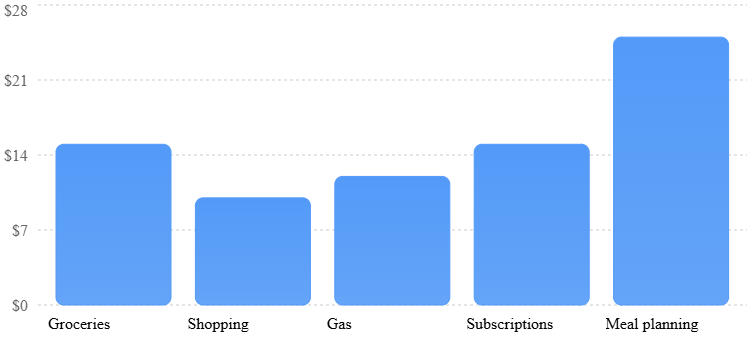
Saving $77 every month would mean $924 over a year.
That money could help pay for:
- School supplies.
- Children’s activities.
- Emergency expenses.
- Holiday spending.
- Family savings goals.
These figures are examples, not average results or promises. Your actual savings may be higher or lower.
10. Why Should Every Family Build a Money-Saving Routine?
A consistent money-saving routine helps parents control household expenses, prepare for unexpected costs, and make better financial decisions. Frugal apps make it easier to monitor spending and identify savings opportunities. When families combine these tools with practical budgeting habits, they can build stronger financial habits over time.
6 Long-Term Benefits of Using Frugal Apps
- Better spending control: Budgeting tools show where household money goes.
- Lower grocery expenses: Cashback and coupon apps help reduce eligible purchases.
- More emergency savings: Reduced unnecessary spending leaves more money available.
- Better financial planning: Families can prepare for school fees and seasonal expenses.
- Financial education for children: Allowance apps introduce basic money management.
- Less food waste: Meal planning and discounted surplus food can reduce unnecessary spending.
The biggest benefit isn’t collecting rewards. It’s developing habits that help your family make better financial decisions.
11. Frequently Asked Questions About the Best Frugal Apps for Parents
Here are common questions parents ask when choosing money-saving apps for groceries, household expenses, and family budgeting.
1. What are the best frugal apps for parents?
The best frugal apps for parents include Ibotta for grocery cashback, Fetch for receipt rewards, Rakuten for online shopping, Flipp for weekly grocery deals, and YNAB for budgeting. Each app serves a different purpose, so choose tools that match your family’s biggest expenses and savings goals.
2. What is the best free app for saving money on groceries?
Flipp is a useful free option for comparing weekly grocery advertisements and finding local discounts. Fetch and Ibotta can also help eligible shoppers earn rewards on purchases. Combining store promotions with cashback offers can reduce grocery expenses without requiring a paid budgeting subscription.
3. Which cashback app pays the most for groceries?
There is no single cashback app that always pays the most. Ibotta offers product-specific grocery rebates, while Fetch provides points for eligible receipts and brand purchases. Compare available offers before shopping because reward amounts, participating retailers, and qualifying products change frequently.
4. Can you use Ibotta and Fetch together?
Yes, you can generally use Ibotta and Fetch on the same qualifying shopping trip because they operate separate reward programs. Ibotta requires eligible offers and purchases, while Fetch rewards qualifying receipts and brands. Always check each app’s current receipt rules and offer conditions.
5. What are the best budgeting apps for families?
YNAB, Monarch Money, and EveryDollar are useful budgeting apps for families. YNAB helps assign every dollar a purpose, Monarch offers a shared financial overview, and EveryDollar provides a straightforward budgeting approach. Compare their features, subscription fees, and account-sharing options before choosing.
6. Are there free money-saving apps with no monthly fees?
Yes. Fetch, Flipp, GasBuddy, and several cashback services offer useful features without requiring a monthly subscription. However, individual services may have optional paid features, eligibility requirements, or transaction conditions. Check the current terms before creating an account.
7. Which apps help parents save money on diapers and baby supplies?
Ibotta, Fetch, and Rakuten can help parents find eligible rewards or discounts on diapers, wipes, and other baby essentials. Check available product offers and participating retailers before shopping. Comparing store prices alongside cashback can help reduce the overall cost of baby supplies.
8. What is the best app for tracking family expenses?
YNAB and Monarch Money are strong options for tracking family expenses. YNAB focuses on planning how money will be spent, while Monarch provides a broader view of household finances. EveryDollar is another option for families who prefer a simpler budgeting approach.
9. Can money-saving apps really save families hundreds of dollars?
Yes, families can potentially save hundreds of dollars annually by combining grocery discounts, cashback, fuel comparisons, and better budgeting. However, results depend on spending habits and available offers. The best results come from reducing existing expenses rather than purchasing additional products to earn rewards.
10. Are cashback and receipt-scanning apps safe to use?
Established cashback and receipt-scanning apps generally use security measures to protect user information. However, they may collect purchase history and other personal data. Use unique passwords, review app permissions, and read privacy policies before linking accounts or submitting receipts.
12. Final Thoughts: Start Saving With the Right Frugal Apps
The best frugal apps for parents can make everyday money management easier. From grocery cashback and online shopping discounts to budgeting and subscription tracking, the right tools help families make smarter spending decisions.
But you don’t need all 17 apps.
Start with one grocery savings app and one budgeting tool. Use them consistently for 30 days and track your actual savings.
Small changes can make a real difference in your family’s budget.
Choose your first two apps today and start keeping more of your hard-earned money.